Google Sheets Formulas
operators
How to Use ABS Formula in Google Sheets
SHARE THIS Article
In this article, you will learn how to get absolute values in Google Sheets.
What is the ABS function in Google Sheets?
In Google Sheets, the ABS formula is used to calculate the absolute value of a number, which is the positive value of a number regardless of its sign.
Why is the ABS formula in Google Sheets beneficial?
Here are some reasons we think the ABS function is useful for you in Google Sheets:
Absolute Value Calculation: Easily calculate the positive value of a number, useful for finding magnitudes or distances.
Handling Negative Values: Quickly convert negative numbers to positive numbers for calculations involving differences, changes, or distances.
Simplified Formulas: Eliminate conditional statements and manual adjustments for negative values, making formulas more concise and readable.
Error Prevention: Prevent miscalculations by treating negative numbers as positive numbers, reducing the risk of errors in case it is applicable and needed.
As shown above, the ABS function is handy when you want to have a positive calculation. Consider including the ABS function in your calculation where needed.
Your next financial spreadsheet could be right here!
100+ spreadsheet templates, from FP&A to tax planning.
Free Spreadsheet Templates
How to use ABS function in Google Sheets
Select a cell you want to show an absolute value
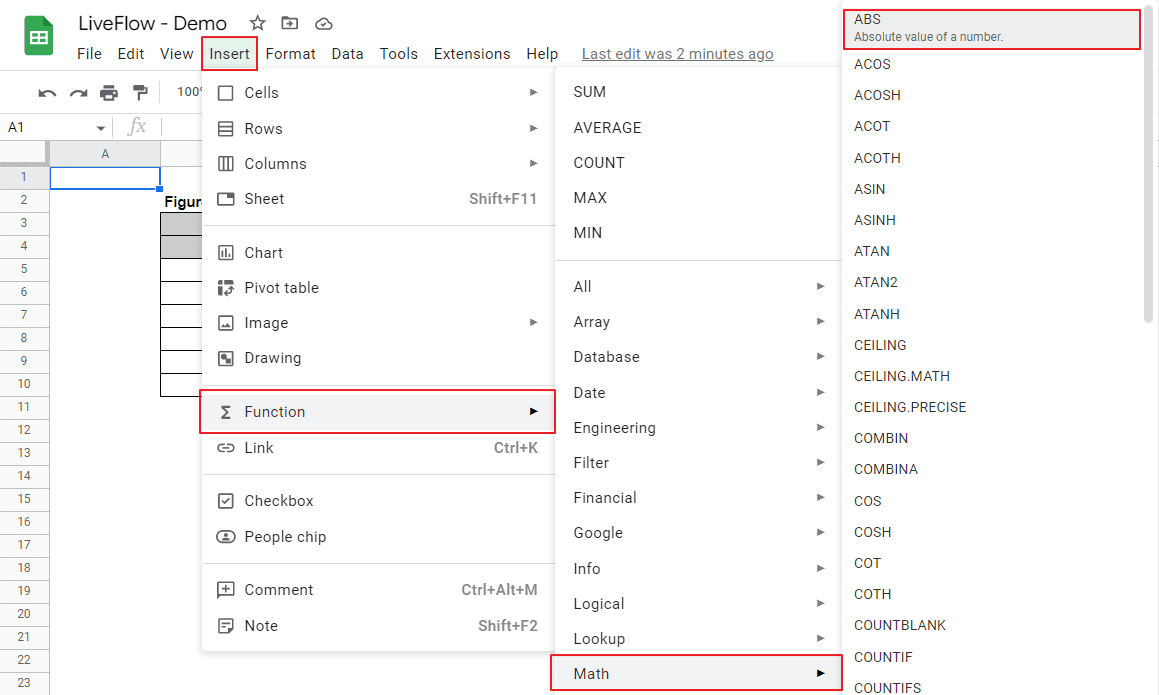
Type in “=ABS(” or go to “Insert” tab, move to “Function”, then hit “Math”, and choose “ABS”.
Input a number or a series of calculations by manual input or cell reference
Done
Generic formula
Value: A number you want to convert to an absolute value.
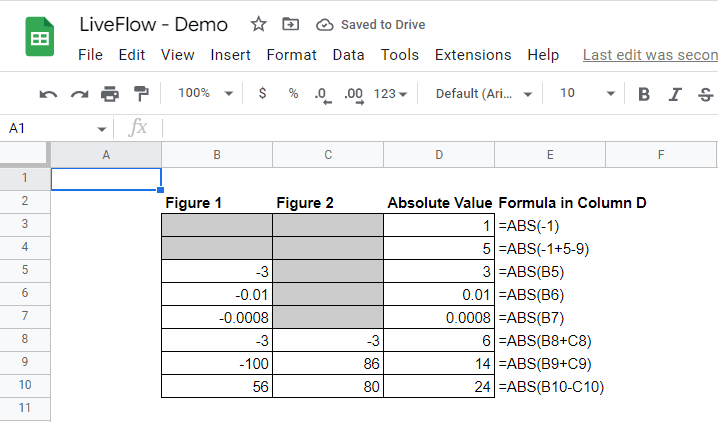
The screenshot below presents examples of how to input value in the formula.
Learn Sheets for financial analysis today!
LiveFlow Academy teaches you the basics for free. Certificates available!
Enroll in LiveFlow Academy
How do you find the mean absolute deviation in Google Sheets?
You can see how to compute the mean absolute deviation in this article (to come).
How do you have absolute references in multiple cells in Google Sheets?
There is an article about relative and absolute references. Go to this page: Relative Reference and Absolute Reference in Google Sheets: Explained
Learn how LiveFlow can save you hours a month on financial reporting!
Just 30 minutes can change the way your business operates forever.
Book a Demo
Supercharge your financial reporting