Excel Formulas
DAYS Formula in Excel: Explained
SHARE THIS Article
In this article you will learn how to use the DAYS function in Excel.
What does the DAYS function in Excel do?
The "DAYS" formula in Excel is a function that calculates the number of days between two dates and returns the result as a positive integer.
What are the uses of the DAYS formula in Excel?
The DAYS function in Excel can be useful in a variety of situations where you need to calculate the number of days between two dates. Here are some common uses of the DAYS formula:
Project planning: You can use the DAYS formula to calculate the number of days between the start and end dates of a project, which can help you schedule tasks and set deadlines.
Financial planning: DAYS formula can be used to calculate the number of days between the start and end of a billing cycle, which can help you plan your budget and manage your finances.
Employee attendance: The DAYS formula calculates the number of days an employee was absent from work, which can be useful for calculating pay and tracking attendance.
Age calculation: You can use the DAYS formula to calculate a person's age by calculating the number of days between their birthdate and the current date.
Loan calculation: You can use the DAYS formula to calculate the number of days between loan payments, which can help you calculate interest and track payments.
Overall, the DAYS formula is a powerful tool that can help you perform various calculations involving dates and times in Excel.
How to Use the DAYS function in Excel?
The syntax for using the DAYS formula in Excel is as follows:
end_date: is the end date of the period for which you want to calculate the number of days.
start_date: is the start date of the period for which you want to calculate the number of days.
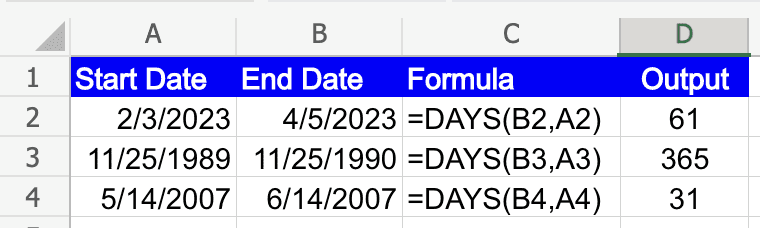
Note: If date arguments are numeric values that fall outside the range of valid dates, DAYS returns the #NUM! error value.
If date arguments are strings that cannot be parsed as valid dates, DAYS returns the #VALUE! error value.
Analyze your live financial data in a snap in Google Sheets
Are you learning this formula to visualize financial data, build a financial model, or conduct financial analysis? In that case, LiveFlow may help you automate manual workflows, update numbers in real-time, and save time. You can access various financial templates on our website, from the simple Income Statement to Multi-Currency Consolidated Financial Statement. Are you interested in this product but are an Excel user? That’s not a problem at all. You can connect Google Sheets to Excel quickly.
To learn more about LiveFlow, book a demo.

You can learn about other Excel and Google Sheets formulas and tips that are not mentioned here on this page: LiveFlow‘s How to Guides
Supercharge your financial reporting